OSCN Oklahoma State Courts Network
- OSCN is free. It’s the official portal to view Oklahoma district court records online.
- Case number search is the fastest and most accurate method. Name searches often fail due to spelling issues.
- Municipal court cases (city tickets) and federal cases are not on OSCN.
- “Disposed” does not mean “convicted.” It just means the case is closed.
- For official or certified copies, contact the county court clerk.
Looking up an Oklahoma court case used to mean a trip to the courthouse. A long wait at the clerk’s window. Sometimes, there is a fee just to see a docket. The Oklahoma State Courts Network changed that.
Now, anyone with a smartphone or laptop can access Oklahoma court records — including civil lawsuits, criminal cases, traffic citations, probate matters, and family court dockets — instantly and at no cost.
But OSCN is not always easy. Cases sometimes don’t show up. PDFs go missing. Names get misspelled. Filters confuse new users.
This guide solves all of that.
Quick Links: OSCN Search Steps | e-filing | e-payments | Careers | Accessibility | Court Dockets | Contact
I am Muhammad Zarrar, a Public Records Researcher with a Bachelor of Criminal Justice. As a researcher, I write guides on OSCN and U.S. court database systems, helping users understand case searches, docket information, and public records access in simple language. This guide is not affiliated with or linked to the official OSCN.net website. Our website, OSCNrecords.com, is created for informational purposes only.
What is OSCN (Oklahoma Court Records)
OSCN — the Oklahoma State Courts Network — serves as the official web-based platform managed by Oklahoma’s judicial system.
It’s operated under the Oklahoma Supreme Court and the Administrative Office of the Courts.
It serves as the public gateway to court records filed in Oklahoma district courts.
Through OSCN, you can:
- Search dockets
- View filings
- Read appellate opinions
- Look up Oklahoma statutes.
- Pay court fines in many counties.
The portal is free. No account required. Updated as clerks process filings.
What OSCN is NOT:
- Not a background check service
- Not a complete record of every Oklahoma case
- Not for municipal (city) court cases
- Not for federal cases (those are on PACER)
Some smaller counties post to a sister system called On Demand Court Records (ODCR) instead.
Oklahoma has 77 counties, and each one has its own district court. OSCN brings the appellate courts and the participating district courts into one free docket search, so you can search a single county or choose All Courts to look statewide. A few counties also post records to On Demand Court Records (ODCR), so if a county case is missing on OSCN, check ODCR next.
What You Can Do on OSCN
OSCN is a full legal research toolkit. Here’s what it lets you do:
- Search court cases by name, case number, attorney, citation number, or business name.
- View docket entries for every filing, hearing, motion, and order.
- Download court documents when they are attached as PDFs.
- Track upcoming hearings and court dates
- Look up appellate opinions from all three Oklahoma appellate courts.
- Browse Oklahoma statutes and the state constitution.
- Pay court fines online in participating counties.
- Monitor cases by bookmarking docket URLs
- Verify attorney information, including bar number.
Used by attorneys, journalists, landlords, employers, genealogists, and ordinary citizens.
Types of OSCN Court Records
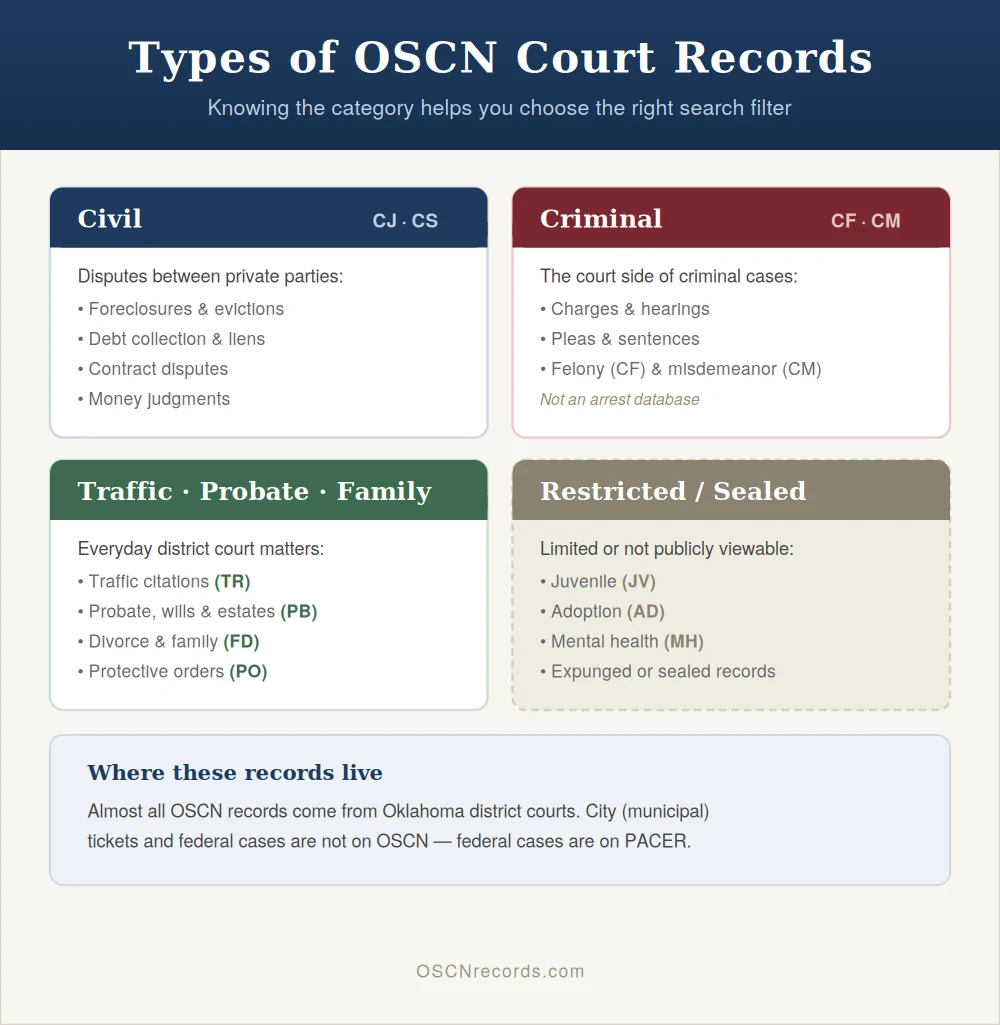
Knowing your case type helps you pick the right filter.
Civil Case
Civil cases cover lawsuits between private parties:
- Personal injury claims
- Contract disputes
- Foreclosures
- Debt collection
- Evictions
- Lien filings
- Money judgments
Case codes: CJ (general civil) and CS (small claims).
Foreclosure and judgment searches are heavily used because they affect property and credit.
Arrest Records (sometimes limited)
OSCN shows the court side of criminal cases — charges, hearings, pleas, and sentences.
It does not function as an arrest database.
For arrest data, use:
- Oklahoma Department of Corrections Prisons Inmate Search.
- County sheriff websites
- The arresting agency directly
Criminal case codes: CF (felony), CM (misdemeanor).
Small Claims Cases
Small claims (code SC) cover disputes typically under $10,000:
- Unpaid rent
- Security deposit fights
- Minor property damage
- Low-dollar consumer disputes
Heavily filed in Oklahoma County, Tulsa County, Cleveland County, and Canadian County.
Other case types you’ll see:
- TR – Traffic
- PB – Probate, wills, guardianships, estates
- FD – Family / divorce
- JV – Juvenile (mostly sealed)
- AD – Adoption (restricted)
- PO – Protective order
- MH – Mental health (restricted)
How to OSCN Case Search Lookup (Step-By-Step)
The Oklahoma State Courts Network lets you look up case information from district courts, the Oklahoma Supreme Court, and the Court of Criminal Appeals. Here is how to use it.
Before You Start
Have any of these ready:
- A case number
- A party name
- A citation number
- The county where the case was filed
Municipal tickets from city police usually do not appear on OSCN. Check your city court site instead.
Step 1: Open OSCN.net
Go to OSCN.net/home in any browser. No login needed.
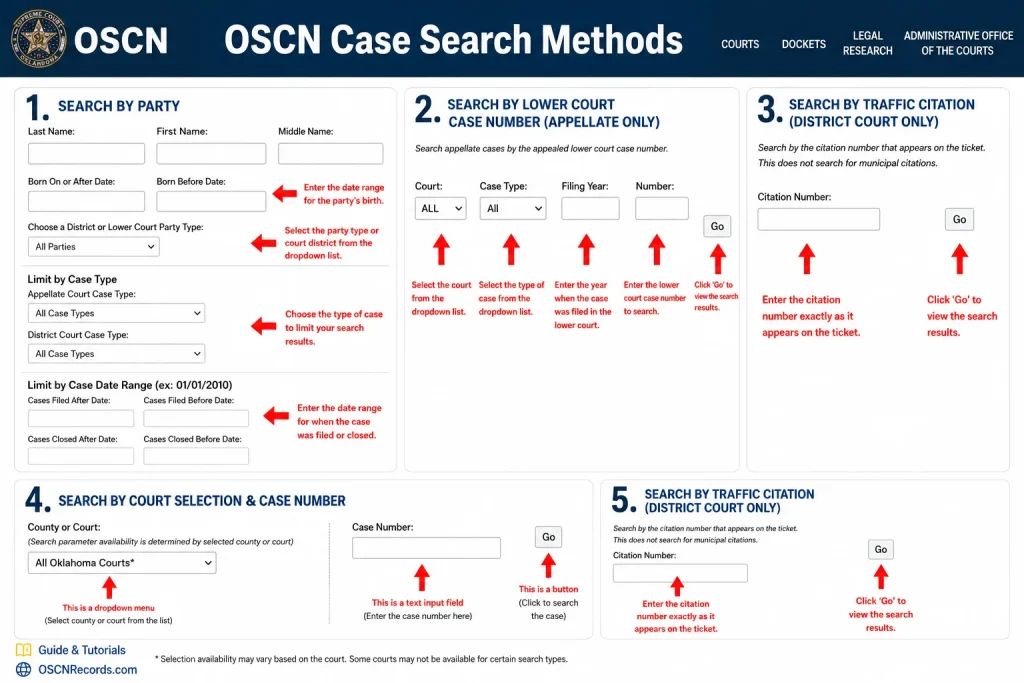
Step 2: Pick Your Search Type
Choose one of these four:
- Case Number if you have it
- Party Name if you only know who was involved
- Citation Number for traffic tickets
- Lower Court Case Number for appeals
- Search by Traffic Citation (District Court Only)
Step 3: Search by Case Number
Fastest method when you have the number.
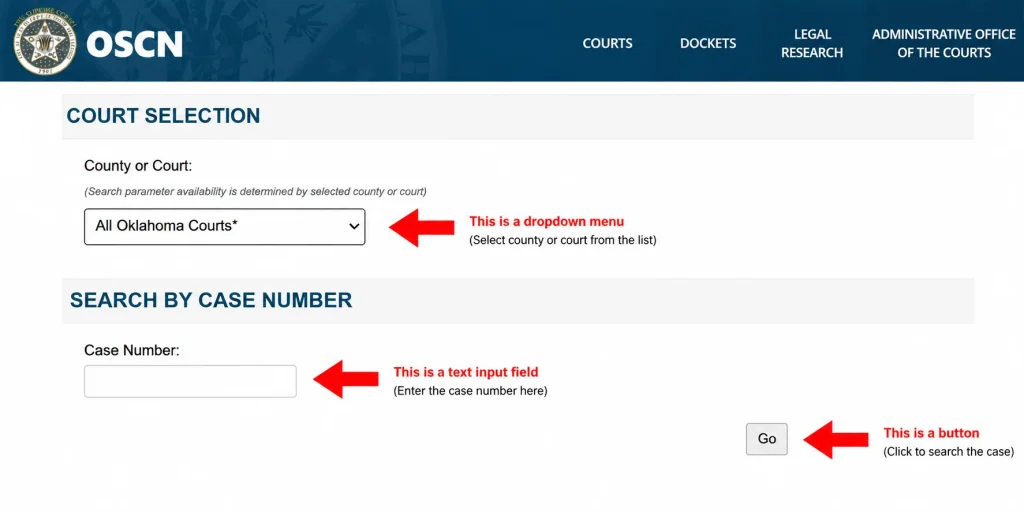
- Select Case Number as your search type
- Choose the county
- Type the full number with dashes and letters
- Click GO
Common formats:
- CJ for civil cases
- CF for criminal cases
- PB for probate cases
- FD for family cases
If nothing shows, check the county or try removing dashes.
How to read an OSCN case number: a number like CF-2026-1234 has three parts. CF is the case type (felony), 2026 is the year the case was filed, and 1234 is the order it was filed in that county that year. Enter the full number with the hyphens and pick the right county for the fastest result.
Step 4: Search by Party Name
Most flexible option.
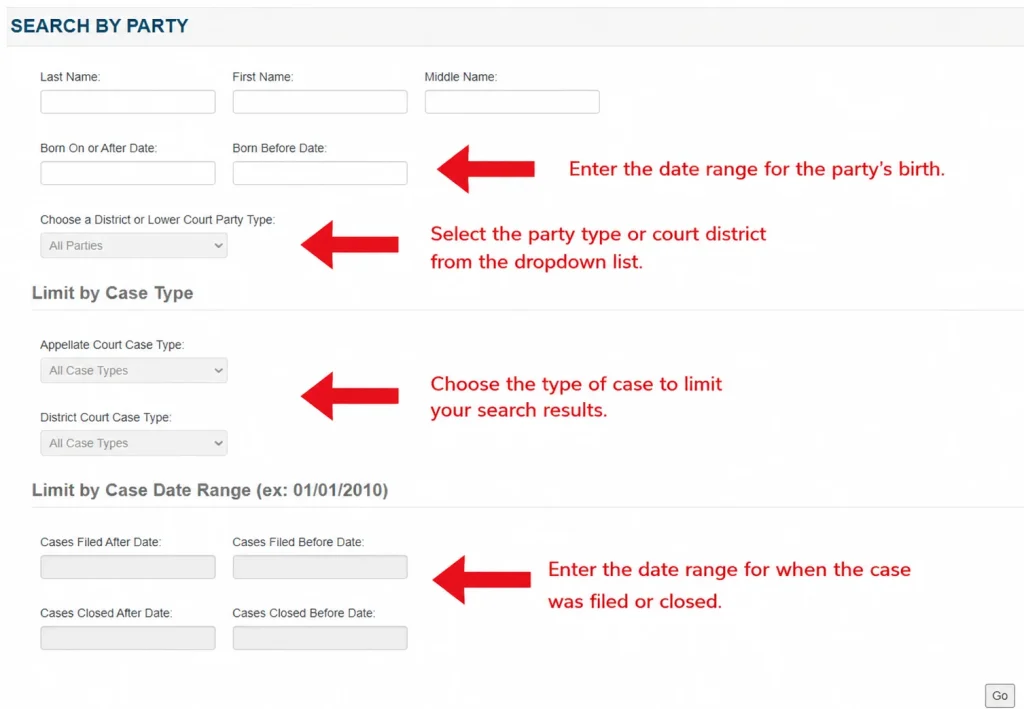
- Select Party Name
- Enter the last name (required)
- Add first name to narrow results
- Pick a county or choose All Courts for a statewide search
- Use filters for case type, party type, or date range
- Click “GO”
Filters available:
- Filed After Date and Filed Before Date
- Cases Closed After and Cases Closed Before
- Party type (plaintiff, defendant)
- Case type (civil, criminal, probate, family)
Tips:
- Start broad, then add filters
- Try spelling variations
- For businesses, use the exact legal name
OSCN lookup by name is free. You do not need an account or a paid background check site. If two people share the same name, compare the date of birth, middle name, and address shown on the case page, and narrow the search by county and filed dates.
Step 5: Search by Lower Court Case Number (Appellate Only)
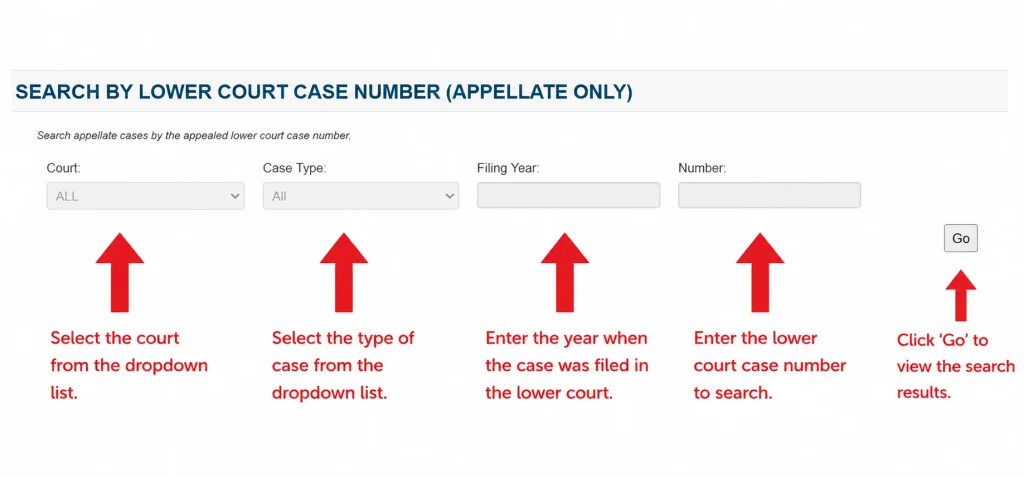
- Select the court where the case was filed.
- Choose case type
- Select the filling year.
- Add your case number.
- Press the Go button for search.
Step 6: Search by Traffic Citation (District Court Only)
For traffic tickets only.
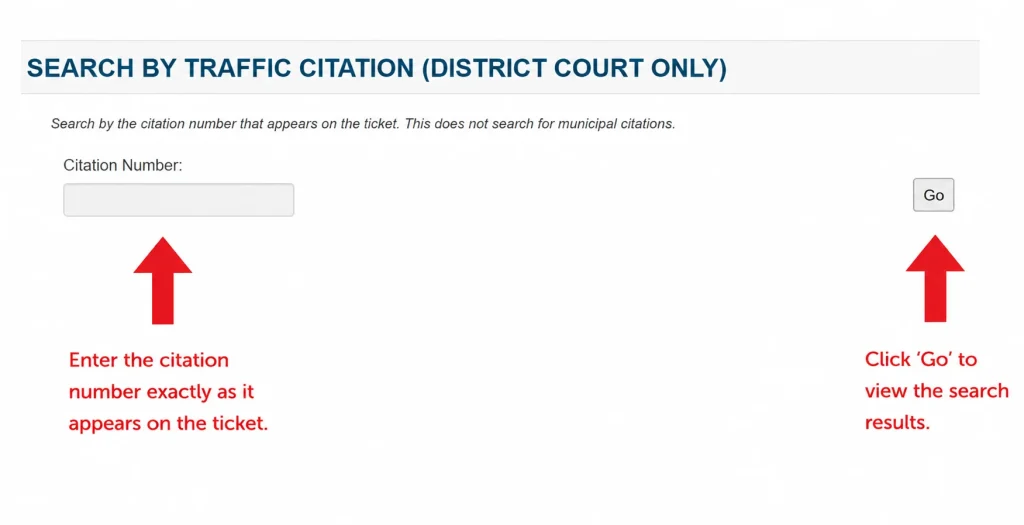
- Select Citation Number
- Type the full ticket number exactly as printed
- Pick the county where you got the ticket
- Click go button.
Recent tickets may take 3 to 5 business days to appear.
Step 7: Reading the Case Page
Click any result to open the full case. You will see:
- Case caption with parties and case number
- Filing date and judge
- Parties marked as plaintiff or defendant
- Attorneys with firm details
- Events like motion docket, court order, vacated judgment
- Issues showing what the case is about
- Docket with every filing, often with PDF or TIFF documents
Quick Tips
- Cast a wide net first, then narrow
- Check spelling twice
- Give new filings a few days to appear
- Sealed cases may not show full details
- Save the URL for cases you are tracking
Common Scenarios
- Foreclosure case → Party Name search, civil case type, county where the property sits
- Tracking an appeal → Lower Court Case Number search
- Statewide name lookup → Party Name with All Courts selected
- Oklahoma inmate search → OSCN shows court cases only, not jail records. Use the Department of Corrections or county sheriff site
Pick the right search type at the start and most lookups take under a minute.
Understanding Your Case Results
Pulling up a docket is one thing.
Reading it is another.
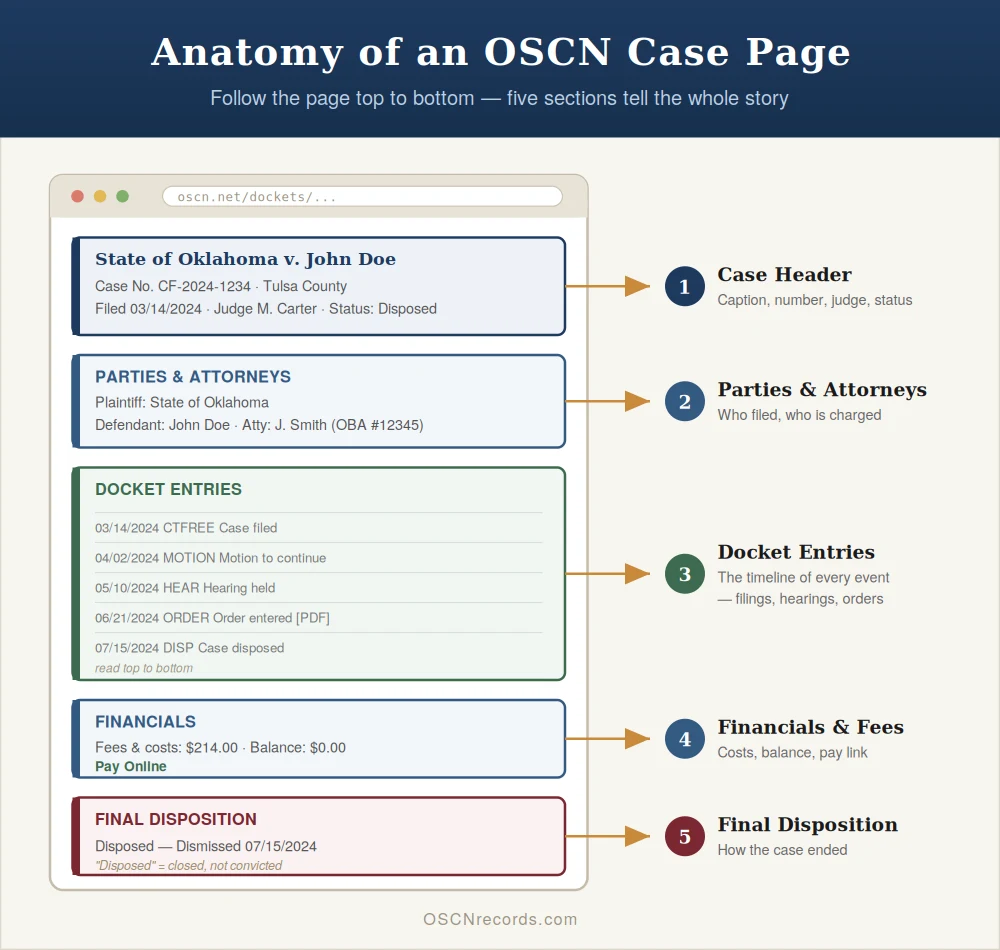
Case Header Section
At the top of every case you’ll see:
- Case caption — formal title (e.g., State of Oklahoma v. John Doe)
- Case number
- Filing date
- Assigned judge
- Case status — active, closed, disposed, or pending.
Parties and Attorneys
Lists every person or entity involved.
- Plaintiff — the one who filed
- Defendant — the one being sued or charged
In criminal cases, the State of Oklahoma is the plaintiff.
Each attorney is listed with their Oklahoma Bar number.
Docket Entries (The Timeline)
The heart of the record.
A chronological log of every event:
- Filings
- Hearings
- Motions
- Orders
- Judgments
Each entry has a date, a code, a description, and sometimes a document link.
Read top-to-bottom for the full story.
Financials and Fees
Many cases include a financials tab showing:
- Filing fees
- Fines
- Court costs
- Payments
A balance owed means money is still due to the court.
Counties that support online payment display a Pay Online link here.
Final Disposition
How the case ended.
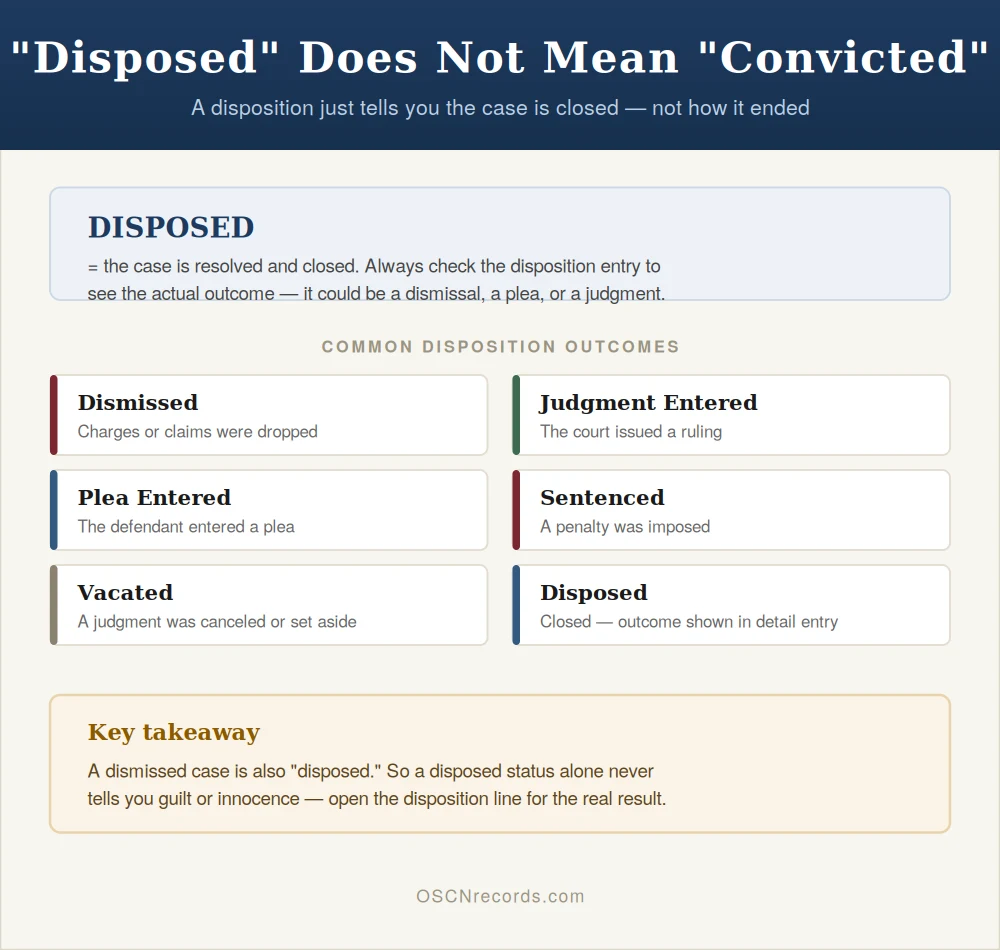
Common dispositions:
- Disposed — case closed.
- Dismissed — charges dropped.
- Judgment Entered — the court ruled.
- Plea Entered — defendant pleaded.
- Sentenced — penalty imposed
- Vacated — judgment canceled or set aside.
Important: “Disposed” doesn’t mean “Convicted.” A dismissed case is also disposed of.
What Records Are Available on OSCN
Usually Available
- Most district court cases since the mid-1990s
- Civil, criminal, family, probate, traffic (state-filed)
- Small claims and appellate cases
Larger counties — Oklahoma, Tulsa, Cleveland, Comanche, and Canadian — have the most complete digital records. For a smaller county example, see our Adair County court records guide.
Limited or Not Available
- Juvenile cases (JV) — confidential by law
- Adoption cases (AD) — sealed
- Mental health proceedings — restricted
- Expunged or sealed cases — removed
- Municipal court cases — not on OSCN
- Federal cases — on PACER, not OSCN
- Some smaller counties — post to ODCR (odcr.com) instead.
Privacy Protections
Oklahoma redacts certain personal identifiers:
- Social Security numbers
- Full birthdates
- Financial account numbers
- Minors’ identifying information.
Victim names in sensitive cases are also withheld.
Limitations of the Oklahoma Case Lookup
OSCN is powerful but not perfect.
Not All Records Are Online
If a case was filed before digital records began in that county, you’ll need the county court clerk.
Some rural counties have spotty digital coverage.
Redaction Policies
Downloaded documents may have blacked-out sections.
This is intentional — personal identifiers are removed for privacy.
Document Availability
“Document Available” means a PDF is available for download.
Many entries don’t have one.
That doesn’t mean nothing was filed — just that the document isn’t uploaded.
Technical Issues
OSCN sometimes goes down or runs slowly.
If a page won’t load:
- Try a different browser.
- Clear your cache
- Come back in a few hours.
Official Record
OSCN records are unofficial.
For court, lending, immigration, or licensing — you need a certified copy from the county court clerk.
Search Limitations
The search engine doesn’t handle typos well.
A single misspelling can hide an entire case.
Always try multiple spellings.
Court Records Not on OSCN: Where to Look Instead
Some Oklahoma records are kept in other systems. If you cannot find what you need on OSCN, try these:
- On Demand Court Records (ODCR) – district court records for counties that post there.
- Federal courts – federal criminal, civil, and bankruptcy cases are not on OSCN. Oklahoma has three federal districts: the Northern District (Tulsa), the Eastern District (Muskogee), and the Western District (Oklahoma City), plus a bankruptcy court in each. Appeals go to the U.S. Court of Appeals for the Tenth Circuit in Denver. Search these through PACER.
- Municipal courts – city tickets and city ordinance cases are handled by each city court, not OSCN.
- Inmate and custody status – use the Oklahoma Department of Corrections offender lookup or Oklahoma VINE. See our Oklahoma inmate search guide.
- Criminal history reports – official background checks come from the Oklahoma State Bureau of Investigation (OSBI), not OSCN.
- Sealed and expunged cases – these are removed from public view. Learn more in our Oklahoma expungement guide.
How to Get Official Certified Copies
Banks, employers, immigration officials, and other courts often require certified copies.
OSCN PDFs are not certified.
Step-by-Step Process
- Find the case on OSCN — note the case number, county, and document description.
- Contact the court clerk in that county (phone and address are on OSCN’s court directory)
- Submit a request — in person, by mail, or online in some counties.
- Pay the fee — usually around $1 per page, plus $5–$10 per document for certification (varies by county)
- Receive the document — by mail or pickup.
Turnaround: a few days to two weeks.
How to Pay Court Fines and Fees Online
Many — not all — Oklahoma counties accept online payments through OSCN.
To pay:
- Open the case docket.
- Look for a Pay Now or Make Payment link.
- Enter the amount and your card information.
- Save the confirmation number.
Payments may take 24–72 hours to post to the docket.
Still not showing after three business days? Call the county court clerk with your confirmation number.
No online payment option? Pay in person, by mail, or by phone.
Accessing Records in Person
Some records aren’t online.
For those, head to the court clerk’s office.
Bring:
- Photo ID
- Case number (if you have it)
- Cash or check for copy fees
Public access terminals are available in most clerk offices for free record viewing.
Older paper-only cases may take longer to retrieve from archives.
Troubleshooting Common Problems
“No Cases Found” When Searching
Try:
- A partial name
- An alternate spelling
- A different county
- A statewide search
If the case definitely exists and still doesn’t appear, it may be sealed, expunged, or filed in municipal court.
The Case Appears, but No Documents Are Attached
This is normal.
Many counties post docket text without uploading PDFs.
Call the clerk to request a copy of the specific filing.
The Recent Case or Filing Doesn’t Appear
OSCN updates as clerks process filings.
New cases typically appear within 24–72 hours.
Busy counties and holidays can stretch that out.
Municipal Traffic Ticket Not Found
City-issued tickets are filed in municipal court — separate from OSCN.
Examples:
- Oklahoma City PD ticket → Oklahoma City Municipal Court
- Tulsa PD ticket → Tulsa Municipal Court
- Norman PD ticket → Norman Municipal Court
Contact the city’s municipal court directly.
Online Payment Made, but Not Reflected on the Docket
Allow 72 business hours.
If it hasn’t been posted yet, call the county court clerk with your transaction confirmation number.
How to Fix Incorrect Information on Court Records
You can’t edit OSCN yourself.
Errors must be corrected through the court clerk — usually by filing a motion or written request.
For serious errors (wrong name, wrong charges) — talk to an attorney.
Advanced Strategies for Power Users
Monitoring Multiple Cases
Bookmark each case URL.
Check them on a schedule (weekly works for active litigation).
Attorneys often use third-party docket-monitoring services.
Tracking Appeals
When a district court case is appealed:
- Search the appellate courts by the original district court case number.
- The appeal will have its own case number, but cross-reference the lower case.
Property Lien Searches
Liens are filed as civil judgments (CJ cases).
Search by the property owner’s name to surface:
- Filed liens
- Foreclosures
- Money judgments
Attorney Monitoring
Search by attorney name to see every case they’re involved in.
Useful for:
- Vetting lawyers
- Tracking opposing counsel
- Verifying experience claims
Judgment Research
For collections work, search by debtor name across counties.
Satisfied judgments remain visible unless the court has been notified and the record updated.
Other Tools on OSCN Besides Docket Search
OSCN is more than a case lookup. Lawyers, students, and researchers also use it for free legal research:
- Oklahoma Statutes and Constitution – the full text of state laws, searchable by title and section.
- Court Rules – the rules that govern filings in the Supreme Court, Court of Criminal Appeals, and district courts.
- Appellate decisions – opinions from the Oklahoma Supreme Court, Court of Criminal Appeals, and Court of Civil Appeals.
- Attorney General opinions – formal legal opinions from the Oklahoma Attorney General.
- Supreme Court calendar and oral arguments – upcoming hearings in the appellate courts.
- Batch Citator – a tool that checks a list of legal citations at once.
- Court news – press releases, judicial appointments, and judge biographies.
Oklahoma Court System Overview
Knowing the court structure helps you know where a case lives.
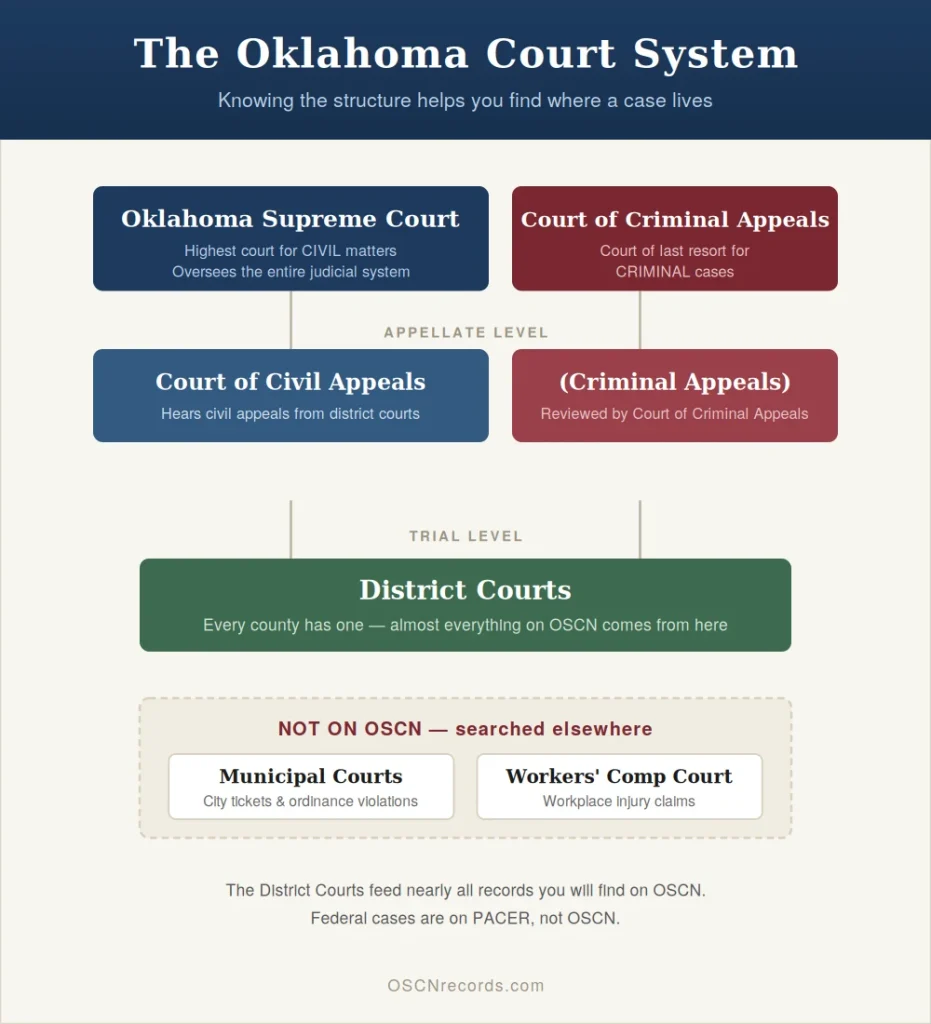
District Courts
The trial-level courts. Every county has one.
Almost everything on OSCN comes from here.
Municipal Courts
City-level courts.
Handle traffic and ordinance violations.
NOT on OSCN. Search the city’s website instead.
Workers’ Compensation Court
For workplace injury claims.
Records handled separately through the Workers’ Compensation Commission.
Court of Civil Appeals
Hears appeals from district courts in civil matters.
Decisions are searchable on OSCN under the Decisions tab.
Court of Criminal Appeals
The Court of Last Resort for criminal cases in Oklahoma.
Final criminal appeals end here.
Oklahoma Supreme Court
The highest court for civil matters.
Administrative authority over the entire judicial system.
Opinions published on OSCN.
Legal Considerations and Limitations
OSCN records are public, but how you use them matters.
Court records in Oklahoma are open to the public under the Oklahoma Open Records Act (51 O.S. § 24A.1 and following). Some records, such as juvenile, adoption, and mental health cases, stay confidential by law.
Be aware:
- Using OSCN data for employment screening can trigger obligations under the Fair Credit Reporting Act.
- The same applies to tenant screening and credit decisions.
- Defamation laws apply to anything you publish about a case.
- Republishing expunged records can expose you to legal liability.
OSCN is also unofficial.
For legal proceedings, immigration filings, or professional licensing, certified copies from the court clerk are required.
Common Case Type Codes
| Code | Meaning |
|---|---|
| CJ | Civil – general |
| CS | Civil – $10,000 or less |
| SC | Small claims |
| CF | Criminal – felony |
| CM | Criminal – misdemeanor |
| TR | Traffic |
| PB | Probate, wills, guardianships, estates |
| FD | Family / divorce |
| JV | Juvenile (restricted) |
| AD | Adoption (sealed) |
| PO | Protective order |
| MH | Mental health (restricted) |
Common Terms You Will See on OSCN Dockets
Court dockets use short legal terms. Here is what the most common ones mean:
- Petition – the document that starts a civil, family, or probate case.
- Summons – the notice that tells a defendant they have been sued and must respond.
- Pro se – a person representing themselves without a lawyer.
- Pauper’s affidavit – a sworn request to waive filing fees for someone who cannot afford them.
- Bond – money or a promise to pay that lets a defendant stay out of jail while the case continues.
- Bench warrant – a warrant a judge issues, often for missing court or not paying fines. See our Oklahoma warrant search guide.
- Deferred sentence – the judge delays sentencing; if the person completes probation, the case can be dismissed.
- Disposition – the final outcome of a case, such as dismissed, guilty, or judgment entered.
- Custody – in family cases, who the children live with; in criminal cases, whether a person is in jail or prison.
Getting Help
Can’t find a case? Can’t read a docket? Hit a wall?
You have options.
Contact Support
For technical issues, OSCN has a contact form on its homepage.
For case-specific questions — missing documents, payment problems, record errors — contact the county court clerk where the case was filed.
For legal questions — including how to respond to a case — contact:
- Oklahoma Bar Association lawyer referral service
- Legal Aid Services of Oklahoma (free help if eligible)
- Oklahoma Free Legal Answers
Don’t rely on internet forums for legal advice on active cases.
FAQs
Is OSCN free to use?
Yes. OSCN is a free public service. No account. No charge for searches or PDFs. The only fees come from the county court clerk — for certified copies or court fines.
Why is my case not showing on OSCN?
The most common reasons: processing delay (give it 24–72 hours), wrong county, misspelled name, a municipal court case (not on OSCN), or a sealed/expunged record. Try a broader search or call the clerk.
Can employers use OSCN for background checks?
Employers can view OSCN directly, but using it for hiring may trigger Fair Credit Reporting Act obligations — especially when third-party screening services are involved. Most professional background checks pull from OSCN plus other databases.
How do I remove records from OSCN?
Only through legal expungement or sealing. You’ll need to file a petition in the court where the case was decided, meet Oklahoma eligibility rules, and obtain a court order. An attorney can guide you through it.
What does “Document Available” mean on OSCN?
A PDF of that filing is uploaded — click to view or download. Entries without that label still exist on the docket, but the document itself isn’t online. Request it from the clerk.
Are municipal court cases on OSCN?
No. City traffic tickets and ordinance violations are handled by municipal courts, each with its own system. Check the official website of the relevant city.
How often does OSCN update?
As clerks process filings, typically within 24–72 hours. Update speed varies by county. Larger counties are faster.
What does “disposed” mean on OSCN?
The case has been resolved and closed. It doesn’t reveal how — dismissed, settled, judgment entered, plea taken. Check the disposition entry for the specific outcome.
How do I tell if I have a warrant in Oklahoma?
OSCN may show pending criminal cases with active warrants, but it’s not a complete Oklahoma Warrant Search database. For confirmation, contact the county sheriff or, more safely, consult a defense attorney before showing up at any office.
Can I find divorce records in Oklahoma on OSCN?
Yes. Divorce cases use the FD case code. Search by either spouse’s name in the appropriate county.
How do I search OSCN by name for free?
Open the OSCN docket search, choose a county or All Courts, type the last name and first name, and click Go. Searching is free and needs no account.
What are non-OSCN counties?
“Non-OSCN” usually means county court records that are posted on On Demand Court Records (ODCR) instead of OSCN. If a county case does not show on OSCN, search ODCR or call that county court clerk.
Does OSCN show federal court cases?
No. OSCN covers Oklahoma state courts only. Federal cases from the Northern, Eastern, and Western Districts of Oklahoma are searched through PACER.
Conclusion
OSCN ranks among the best public records systems offered by any state, but only if you know the right way to search.
Most failed searches come down to small things:
- Wrong county
- Misspelled name
- Recent filing not yet indexed
- A case that lives in municipal court, not district court
Work through this guide step by step. Double-check your inputs. You’ll find most Oklahoma court records you’re looking for in minutes.
Remember:
- OSCN is unofficial — certified copies come from the county court clerk
- Trying to clear your own record? Talk to an attorney about expungement first.
- Active case? Don’t rely on internet forums for advice.
Ready to search?
Head to oscn.net, pick your county, and start with a name or case number.
The record you need is probably already there.
A letter From Muhammad Zarrar

My intention is to provide helpful information for people who do not understand complex legal terminology. I purely provide informational material to help users navigate public court record systems more easily.
I am Muhammad Zarrar, a Public Records Researcher with a Bachelor of Criminal Justice. I research and write guides on OSCN and U.S. court database systems, helping users understand case searches, docket information, and public records access in simple language.
If you need official records or verified court information, please visit the official OSCN website at OSCN.net.
Thank you for visiting. If you found my guide helpful, please leave a comment.