
OSCN Docket Search
- Docket search is free on OSCN. No login or account needed.
- Case number lookup gives the fastest result. Format looks like CF-2024-1.
- Party name search works when you don’t have the case number.
- All 77 Oklahoma counties are listed. Coverage is strongest in larger counties.
- New filings appear in 24 to 72 hours after the clerk processes them.
OSCN Records is an independent guide. We are not affiliated with OSCN.net, the Oklahoma courts, or any government agency.
The OSCN docket search pulls up the full timeline of an Oklahoma court case. Every filing, every hearing, every order. It’s the free, official way to view Oklahoma court dockets online.
No account. No fee. Works on any phone or laptop.
This guide walks through the search steps, the filters, and the fixes when nothing comes up. For background on the portal itself, see our OSCN homepage guide.
What a Docket Actually Shows
A court docket is the running log of a case. Each line on the docket is called a docket entry. It carries a date, a short description, and sometimes a link to the actual document.
On an OSCN docket sheet you’ll see:
- Case caption and case number
- Filing date
- Plaintiff and defendant
- Attorneys with bar numbers
- Judge assigned
- Bond amount and bondsman details
- Arresting agency (criminal cases)
- Every motion filed
- Every court order
- Every hearing date
- Fines and payments
- Final disposition
Read it top to bottom. That’s the whole case.
If a case has more than one defendant, the docket lists entries for each one separately. Make sure you’re reading the entry that applies to the person you’re tracking.
How to Search OSCN Dockets
There are five ways to run an OSCN docket search. Pick the one that matches what you have.
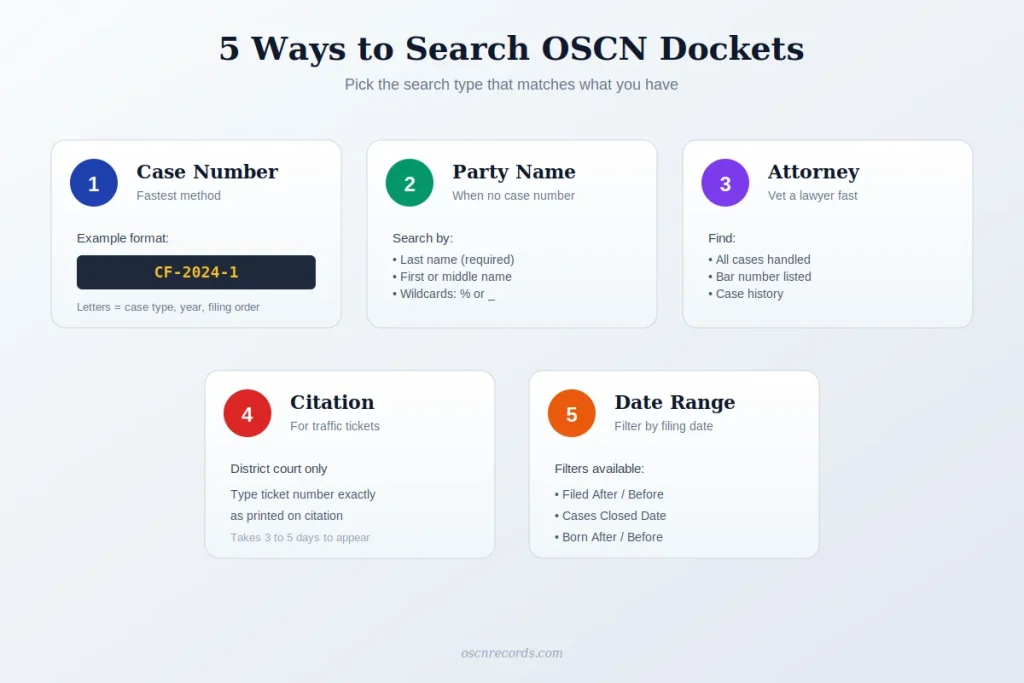
1. OSCN Docket Search by Case Number
This is the fastest method.
Steps:
- Open oscn.net
- Click Court Records
- Click Case Number Lookup
- Pick the county
- Type the case number
- Hit GO
A case number looks like CF-2024-1. The letters show case type. The middle is the filing year. The last part is the order it was filed in. Older cases may use slightly different formats.
2. OSCN Docket Search by Party Name
Use this when you don’t have a case number.
Steps:
- Click Search OSCN Dockets
- Type the last name (required)
- Add first or middle name to narrow it
- Pick a county, or pick All Oklahoma Courts for a statewide search
- Hit GO
Last name search tips:
- Try spelling variations.
- Use % as a wildcard for any letters.
- Use _ for one letter.
- For businesses, enter the exact legal name.
A search like Smi% returns Smith, Smiley, and similar names.
3. OSCN Docket Search by Attorney
Type the attorney’s name in the party name field.
You’ll see every case that attorney is listed on. Useful for vetting a lawyer, checking attorney case history, or tracking opposing counsel.
4. OSCN Docket Search by Citation Number
For traffic citations filed in district court. Use this for an OSCN traffic ticket lookup or to check the status of a state-issued ticket.
Steps:
- Pick Citation Number
- Type the ticket number exactly as printed
- Pick the county
New citations take 3 to 5 business days to show up. Tickets from city police (Oklahoma City PD, Tulsa PD, etc.) won’t appear here. Those are municipal court tickets and live on the city’s own system.
5. OSCN Docket Search by Date
Use the date filters in the party name search.
Available filters:
- Filed After Date
- Filed Before Date
- Cases Closed After
- Cases Closed Before
- Born After Date
- Born Before Date
Date ranges work well when you want all criminal felony cases filed in one county this year, or every probate case from a specific month.
Search by County or Statewide
A statewide search is the easiest path when you don’t know where the case was filed. Pick All Oklahoma Courts and the lookup runs across every county listed on OSCN.
Coverage varies. Larger counties have full docket data on OSCN. Smaller and rural counties may have limited entries, or their records may sit on ODCR instead.
Most active counties on OSCN:
- Oklahoma County (largest docket volume)
- Tulsa County
- Cleveland County
- Canadian County
- Comanche County
- Creek County
- Payne County
- Rogers County
- Muskogee County
- Wagoner County
- Pottawatomie County
- Garfield County
For a full directory, check the court directory on oscn.net.
OSCN Docket Search by Case Type
Filter your search by case type to narrow results fast.
The most-searched docket types:
- Criminal docket search uses CF (felony) or CM (misdemeanor).
- Civil docket search uses CJ.
- Traffic docket search uses TR.
- Family docket search uses FD.
- Probate docket search uses PB.
- Small claims uses SC.
Add the filter after picking your search type. Results narrow instantly.
OSCN Dockets by Judge
Want to find cases assigned to a specific judge?
Two ways:
- Open any docket and the judge’s name shows in the case header.
- For a judge’s hearing schedule, check the county’s daily docket.
OSCN Appellate Docket Search
For appeals, OSCN uses a different lookup.
Steps:
- Pick the appellate court (Civil Appeals, Criminal Appeals, or Oklahoma Supreme Court)
- Select case type
- Enter the filing year
- Add the original lower court case number
- Hit GO
This pulls the appellate docket cross-referenced to the district court case.
Reading a Docket Sheet
Once a docket opens, entries are listed in date order. Many counties use colored text as a shortcut for the type of entry.
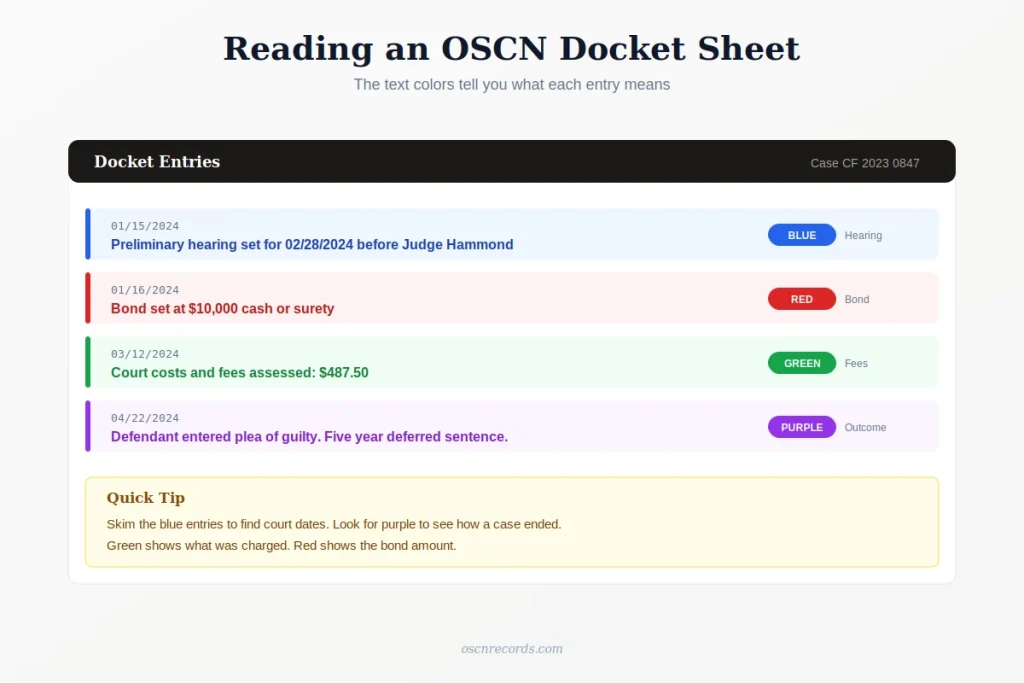
- Blue text usually means a court appearance or hearing date.
- Purple text usually means the case outcome.
- Green text usually means fines, fees, or payments.
- Red text usually means a bond amount.
Color use can vary across counties, but the pattern is common enough to skim. Use the blue entries to find your next court date. Look for purple to see how a case ended.
Each entry has a date, a docket code, the docket text, and sometimes a PDF or TIFF link to the filed document.
The docket code at the start of each entry is a short label. ARR is an arraignment. MO is a motion. ORD is an order. CTFREE is a court date. These codes can vary by county, but the description right next to the code spells out what happened in plain language.
What “Document Available” Means
A PDF or TIFF of that filing is uploaded. Click to view or download.
If no link is shown, the document was filed but not uploaded. Some entries also say “Document Available at the Court Clerk’s Office” — that means the file exists but isn’t online. You’ll need to call or visit the clerk to get a copy.
Daily Dockets
Many Oklahoma counties post a daily docket. It lists every case scheduled for a hearing that day, often grouped by judge.
To find one, open the dockets page on oscn.net and look for daily docket reports under the county. Common options include Daily Docket – All Events or Daily Docket – Specific Judge.
Handy if you forgot your court date or you’re tracking a specific hearing.
How to Download Docket Documents
When a PDF link sits next to a docket entry, click it. The file opens in your browser. Save or print it from there.
Older filings may not have documents online. Call the county court clerk for those.
Common Docket Terms
You’ll see these on most dockets.
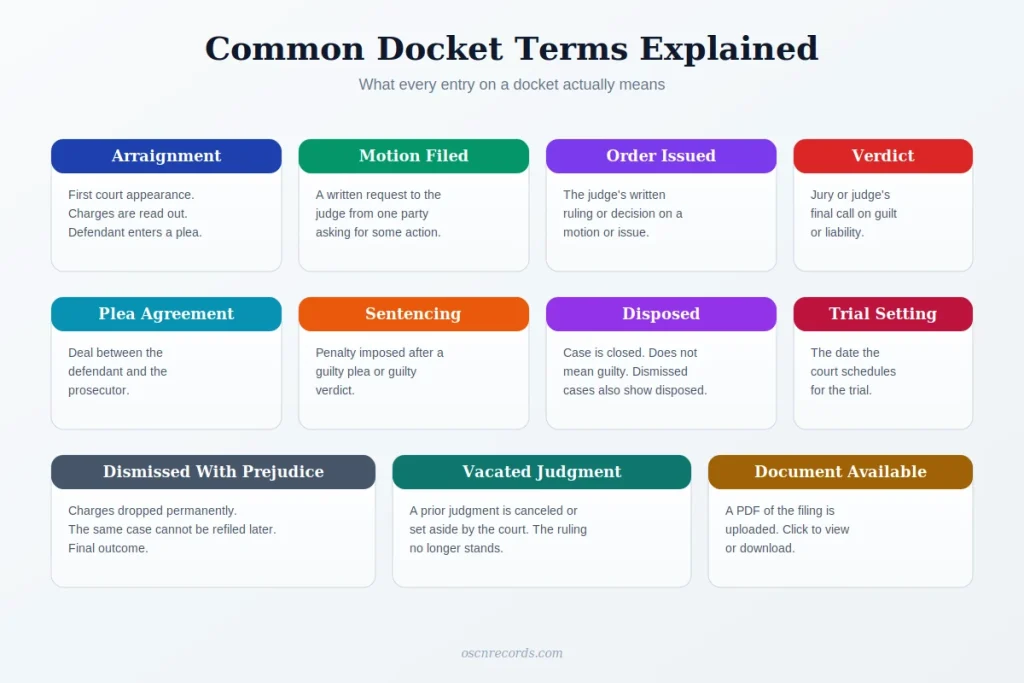
- Arraignment: first court appearance, charges read.
- Motion filed: a written request to the judge.
- Order issued: judge’s written ruling.
- Plea agreement: deal between defendant and prosecutor.
- Sentencing: penalty imposed.
- Verdict: jury or judge’s final call.
- Disposed: case closed.
- Dismissed with prejudice: cannot be refiled.
- Vacated judgment: judgment canceled.
- Trial setting: date set for trial.
Why a Docket Won’t Show Up
Common reasons your search fails:
- The case was filed in the last 1 to 3 days and isn’t indexed yet.
- Wrong county selected.
- Name misspelled.
- It’s a municipal court ticket, not OSCN.
- The case is sealed or expunged.
- The county posts to ODCR instead.
Start with a broad search. Narrow it from there.
What OSCN Docket Search Won’t Cover
A few things sit outside OSCN.
- City tickets from Oklahoma City PD, Tulsa PD, Norman PD, or any city police. Those go to the municipal court.
- Federal cases. Use PACER.
- Juvenile, adoption, and mental health cases. Sealed or restricted by law.
- Inmate or arrest records. OSCN shows the court side of a case, not jail bookings. For an Oklahoma inmate search, use the Oklahoma Department of Corrections or the county sheriff.
- Workers’ compensation claims. Handled by the Workers’ Compensation Commission.
- Old paper-only cases. Call the county clerk.
OSCN vs ODCR
Two different portals cover Oklahoma court records.
- OSCN is free and run by the state. Best for larger counties.
- ODCR is a private service. Document images usually require a paid subscription (limited to bar members).
A few cases appear on both. If a county isn’t on OSCN, try ODCR next.
Real-Time Updates and Alerts
OSCN does not send email alerts or push notifications. There is no subscription service built in.
To track a case yourself, bookmark the case URL and check it on a schedule.
Paid third-party docket monitors can layer alerts and bulk access on top of OSCN data. Lawyers handling many cases often use them. None of these are run by the state courts.
OSCN also runs separate sites for e-filing and online payments, but those are tools for attorneys and people paying fines, not search portals.
Using OSCN for Background Research
People pull OSCN dockets for many reasons.
Common uses:
- Tenant screening before signing a lease.
- Pre-employment background checks.
- Vetting an attorney before hiring.
- Property lien and judgment searches.
- Divorce or family history lookup.
- Genealogy research.
One caution: using OSCN for hiring or tenant decisions can trigger Fair Credit Reporting Act rules. OSCN by itself is not a full background check.
Mobile Use
OSCN works on any phone browser. The mobile site looks plain but loads fast.
A mobile docket lookup follows the same steps as desktop. Open oscn.net, tap Court Records, type the case number or party name, pick a county, and the docket opens.
There is no official OSCN app. Some private services offer paid apps with alerts.
FAQs
How do I search OSCN dockets?
Open oscn.net, tap Court Records, pick Search OSCN Dockets, choose case number or party name, pick a county, and tap GO.
Is OSCN docket search free?
Yes. No login. No fee. Certified copies cost money but searches don’t.
How do I find a docket number?
Search by party name. Open the matching case. The docket number sits at the top.
How often is OSCN updated?
Most new filings appear in 24 to 72 hours after the clerk processes them. Larger counties update faster.
What is a docket entry?
One line on the docket. Each entry records one event in the case, like a motion filed, an order issued, or a hearing scheduled.
How do I print an OSCN docket?
Open the case page. Press Ctrl + P on Windows or Cmd + P on Mac.
Why won’t OSCN load?
The site goes down sometimes. Try a different browser, clear your cache, or check again later.
Why are docket entries missing?
Either the clerk hasn’t uploaded the document, or the case is older than the county’s online records.
Can I view docket online for free?
Yes. OSCN is a free public portal. No subscription needed.
Can I download court documents free?
Yes, when the PDF link is shown next to the entry. Older files may need a clerk request.
Can I search OSCN by attorney name?
Yes. Type the attorney’s name in the party name field.
Can I search all 77 counties at once?
Yes. Pick All Oklahoma Courts in the party name search. Coverage varies by county.
Why is my case not on OSCN?
Common reasons: it was filed in the last few days and isn’t indexed yet, it’s a municipal court case, it was sealed or expunged, or the county posts to ODCR instead.
Can I get email alerts for OSCN updates?
Not from OSCN. Use a third-party docket monitor.
How long do dockets stay on OSCN?
Indefinitely, unless the case is sealed or expunged. Most counties have records going back to the mid 1990s.
Where is the OSCN docket search page?
Inside oscn.net under Court Records. Direct URL: oscn.net/dockets/Search.aspx
Can employers see OSCN dockets?
Yes. Anyone can view them. Employers using OSCN for hiring decisions may have to follow Fair Credit Reporting Act rules.
What’s the difference between OSCN and ODCR?
OSCN is free and covers larger Oklahoma counties. ODCR is a paid service that covers many rural counties. Some cases appear on both.
Final Word
OSCN puts Oklahoma’s court records in your pocket. No drive to the courthouse, no waiting at the clerk’s window.
The trick is knowing which search to use. Case number gets you there in seconds. Party name works when you only know who was involved. Everything else is just filters.
Open oscn.net, pick a search type, and start. The docket you need is probably already there.
A letter From Muhammad Zarrar

My intention is to provide helpful information for people who do not understand complex legal terminology. I purely provide informational material to help users navigate public court record systems more easily.
I am Muhammad Zarrar, a Public Records Researcher with a Bachelor of Criminal Justice. I research and write guides on OSCN and U.S. court database systems, helping users understand case searches, docket information, and public records access in simple language.
If you need official records or verified court information, please visit the official OSCN website at OSCN.net.
Thank you for visiting. If you found my guide helpful, please leave a comment.